GuidesSettings
Complete settings reference
Every clinic, laboratory, and personal settings feature, with its purpose and downstream effect.
This is the complete settings index for the current GuideLab application.
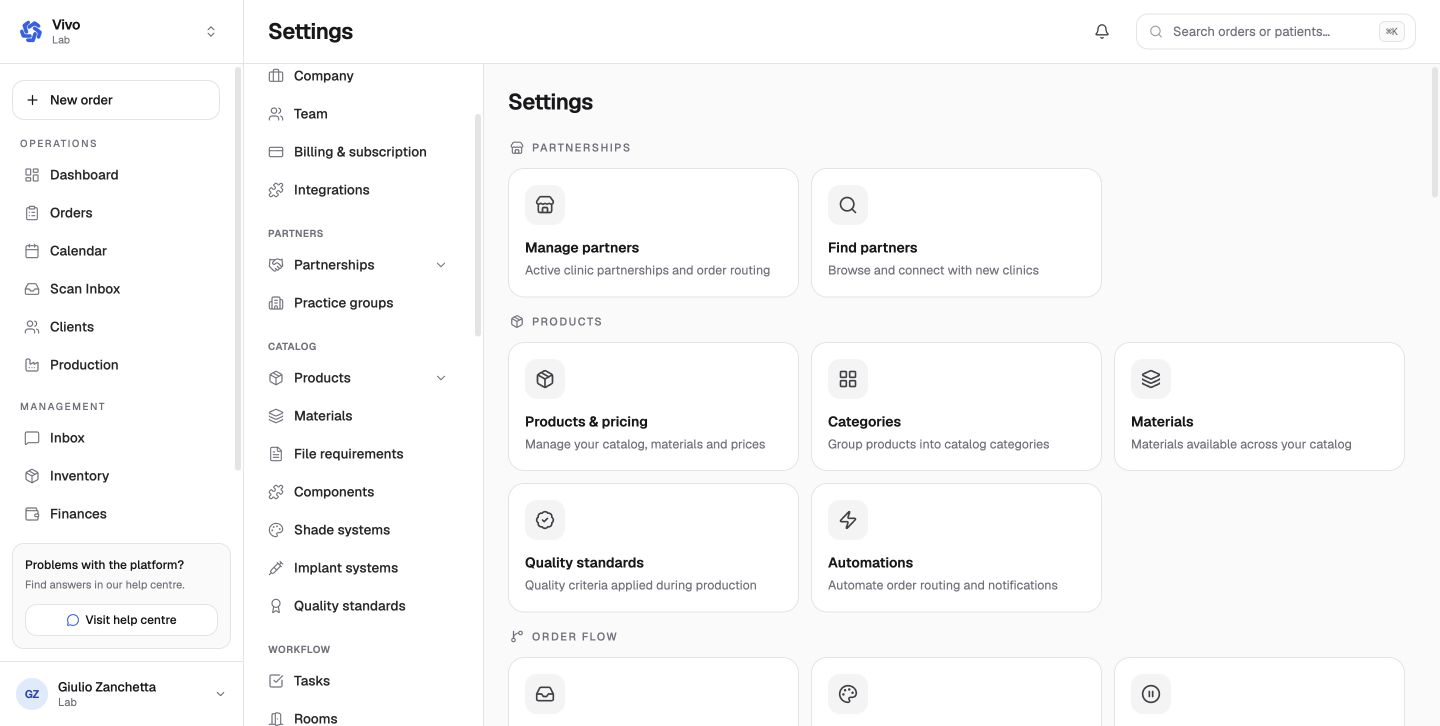
Access rules
- Owners and admins manage most organization settings.
- Staff can inspect most settings in a read-only state.
- Organization billing and subscription controls are owner-only.
- Laboratory finance settings are manager-accessible, but Stripe connection controls remain owner-only.
- Personal account settings belong to the signed-in user, not the active organization.
Clinic settings
| Setting | Purpose and downstream effect |
|---|---|
| Settings | Directory of clinic configuration areas |
| Company | Organization name, brand, contacts, company/tax data, address, timezone, and currency |
| Team | Members, pending invitations, join requests, and organization roles |
| Billing | Saved payment methods and permitted autopay behavior for each connected lab |
| Integrations | Dentally patient-data synchronization; scanner providers are configured separately |
| My labs | Active and pending laboratory relationships and routing |
| Find labs | Search discoverable labs by service and request a partnership |
| Locations | Clinic branches, addresses, phones, default location, and active state |
| Scanner | Supported intraoral scanner connections and global scanner behavior |
| Filter presets | Saved order-list filters, sort, columns, and live count cards |
| Inventory settings | Low-stock alerts, expiry warning window, and auto-deduction |
| Inventory categories | Ordered clinical stock categories |
| Adjustment Reasons | Auditable reasons for manual stock changes |
| Uploaded Files | Clinic-wide scans, photos, documents, X-rays, and other uploads |
| Scanner Explorer | Cases available from connected scanner APIs |
Laboratory settings: account and partners
| Setting | Purpose and downstream effect |
|---|---|
| Company | Laboratory identity, brand, contacts, company/tax data, address, timezone, and currency |
| Team | Members, invitations, join requests, and roles |
| Billing & subscription | Plan, accepted-case allowance, pooled storage, add-ons, billing period, and payment details |
| Integrations | ExoCAD, HeyGears, Xero, Fatture in Cloud, Ariba, Twilio, Bite-Finder, and future providers |
| Clients (outside settings) | Clinic partnerships, invitations and per-client price list and payment terms |
| Practice groups | Group clinics for management, reporting, consolidation, and custom export |
Laboratory settings: catalog
| Setting | Purpose and downstream effect |
|---|---|
| Products & pricing | Orderable services, SKU, visibility, price, turnaround, material requirements, custom fields, and conditional configuration |
| Bundles | One priced selection containing multiple catalog products |
| Categories | Ordered product hierarchy used for browsing and reporting |
| Materials | Reusable catalog materials and codes |
| File requirements | Required order attachments and accepted formats |
| Components | Reusable technical components referenced by products |
| Shade systems | Shade options and default systems exposed in product configuration |
| Implant systems | Implant manufacturers, systems, and platforms used by orders |
| Quality standards | QC criteria that can be applied during production |
Laboratory settings: workflow and order operations
| Setting | Purpose and downstream effect |
|---|---|
| Tasks | Concrete production work and task behavior |
| Rooms | Workstations, room layout, and production routing |
| Phases | Ordered production stages, tasks, and planned-date offsets |
| Printers | Physical output devices used by production and labels |
| Automations | Trigger/condition/action rules for routing and notifications |
| Production settings | Planning, cutoff, buffer, capacity, grouping, sorting, columns, barcode scanning, and exclusions |
| Tags | Custom labels for order categorization |
| Filter presets | Saved order-list views with live counts |
| Work Trays | Physical tray codes, colors, active state, and current-order assignment |
| Hold reasons | Ordered reasons used when pausing an order |
| Remake & QC List | Remake reasons and discount percentages plus QC checklist items |
| Calendar | Operating days, bank holidays, closures, and time off used by due-date calculations |
| Scanner | Scanner-provider connections and global settings |
| Inventory settings | Alerts, expiry window, and completion-time material deduction |
| Inventory categories | Ordered material stock categories |
| Adjustment Reasons | Auditable stock-change reasons |
| Location route | Pickup/delivery routes, delivery days, default, and active state |
| Pickup Requests | Clinic-facing pickup request form and workflow |
| Shipping | Shipping types, zones, "from X g" prices, VAT and insurance clinics pay at checkout |
Laboratory settings: communications, finance, and data
| Setting | Purpose and downstream effect |
|---|---|
| Email Templates | Reusable and automated email subjects/bodies with merge data |
| Sticker Templates | Printable product-label layouts and categories |
| WhatsApp Templates | Twilio-approved templates and event-level selection |
| Document branding | Titles, footer, logo, terms, manufacture statement, and product-detail options |
| Finance settings | Invoice terms, reminders, credit hold, bank transfer, statements, late fees, payment policy, tax, and finance emails |
| Import | Restore a GuideLab bundle or import products, clients, price lists, and balances from CSV |
| Export | Re-importable bundle sections or focused CSV exports |
| Archived Orders | Search and restore archived orders |
| Archived Patients | Search and restore archived patient records |
Use the following pages for detailed configuration guidance: